Where selling gets stuck, and how spk and spl address it
Plenty of people can write iOS automation scripts. Fewer charge for them. The block usually has three parts. Send the source, and the customer can pass it on. One sale becomes unlimited copies. Trials and renewals cannot be controlled. Each sale is a one-off. You hesitate to offer a trial, and if they buy and do not renew, you have no lever. Without version management and a license system, every environment change comes back to you, and every code fix has to be sent to every customer one by one. EasyClick workflows use a .spk package plus an .spl license, and turn the script into a file you can send again and charge for by term. Android has had script distribution and licensing for a long time. On iOS that set was missing, and authors could only deliver source per project.
spk is EasyClick’s workflow package format. It packs script code, config files, image assets, and dependencies into one file you can distribute. The customer imports it into the console and runs it, without seeing the source. The customer does not set up a development environment, and the author does not hand over the source.
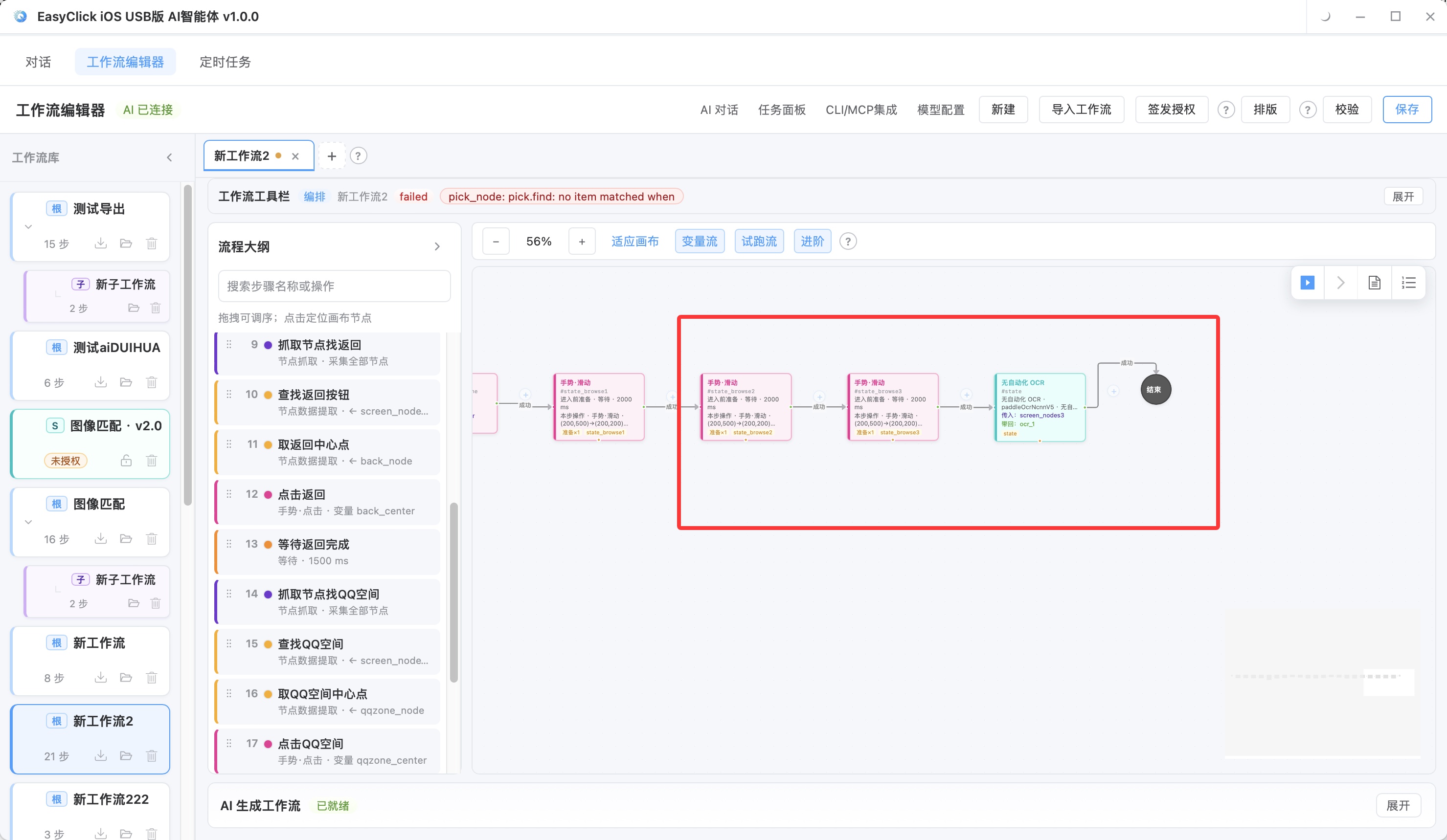
The picture above is the workflow editor before packaging. On the canvas you drag steps (tap, swipe, OCR) and connect them into an automation chain. After editing, save into an spk package. The customer imports the spk in the console, picks the target devices, and runs it, without seeing the source code.
| Advantage | What it means |
|---|---|
| Simple delivery | The customer gets one file, imports it, and runs it, with no development environment to configure |
| Implementation stays separate | Packaged distribution keeps the source from being handed over directly, and protects the author’s work |
| One standard | Teams or a community reuse the same format, which lowers the cost of working together |
| Version management | An upgrade is a new package. The customer imports the new version. Version numbers are easy to trace |
| Dependencies included | Resource files and config the script needs are packed in, so a missing file does not fail the run |
When packing, confirm that every resource file (images, models, config) is included, so the run does not fail looking for a file. Do not hard-code local paths in the script (such as D:\my_scripts\...). Use relative paths so it works across machines. Manage version numbers. Put a version number in the script so you can locate the build when a customer reports a problem. Before packing, run a full functional test in a clean environment, and confirm it runs after import.
spl is EasyClick’s license file format. It controls who may use the workflow package. Without an spl license, the spk package cannot run normally. You can send the package out. Without the matching license, it will not run.
| License dimension | What it means | Typical use |
|---|---|---|
| Device binding | Bind the license to a device or a device group | Stop one license from being used on many devices |
| License term | License by day, month, or year, and it stops at the end | Monthly, quarterly, and yearly subscriptions |
| Trial limit | A limited trial that converts to a full license | Give the customer a 3-day trial, and they pay if it fits |
| Scope of use | Control features or channel count | Sell basic, professional, and enterprise tiers |
The license file covers two things: who may use it, and until when. A subscription can charge by term because the license stops when the term ends. When you generate an spl, look at three dimensions. Device-binding grain: one device is the strictest, a device group fits bulk customers, and a license code fits flexible distribution. Term: a trial of 3 to 7 days is a reasonable range, and a paid license is monthly, quarterly, or yearly, with a renewal reminder before it ends. Feature tiers: the basic edition limits features or channel count, the professional edition is full-featured, and the enterprise edition adds multi-device support. The full flow:
Customer gets a trial spk → imports it and runs the trial → the trial fits
  → buys an spl license → binds devices and uses it for real
  → renews at expiry → gets a new spl and keeps using it
  → author publishes a new spk → customer imports the upgrade
That chain matches the three problems above: after spk packaging the source does not travel with the package, the spl expires and they renew, and a new version is a new package.
Five models, and where the money comes from
Pick a model from what you can deliver and how your customers are structured. Several can be stacked:
| Model | What it is | Who it fits | How the income looks |
|---|---|---|---|
| Finished product | Sell an spk package plus an spl license | Developers with a general-purpose script | Build once, sell many copies |
| Custom development | Write a workflow to a customer’s spec, delivered with a license | Service shops and studios | High price per customer, project by project |
| Subscription | Regular script updates plus license renewal | Scripts that run as an ongoing operation | Steady ongoing income |
| Managed operations | Run the automation for the customer and maintain it | Teams that have devices or staff | Monthly or yearly fees that continue |
| Platform distribution | List on a script market and share revenue | Developers who want a channel | The platform takes a cut, and customer acquisition costs less |
An individual developer can combine finished-product sales with a subscription: pack a general script and charge the license monthly or yearly. A studio or service shop can combine custom development with managed operations: take custom work, and also charge a monthly or yearly hosting fee. An author who has a channel can sell directly and also list on a platform. Strengths and weaknesses:
| Model | Strength | Weakness |
|---|---|---|
| Finished product | Low marginal cost. One package can be sold many times | You need enough of the right customers |
| Custom development | High price per customer, and the requirement is clear | Long delivery, and it takes a lot of people |
| Subscription | Income you can forecast, and customers tend to stay | The script has to keep being updated, so maintenance continues |
| Managed operations | Steady income, and the customer is tied in deeply | Needs devices and staff. Operations are heavy |
| Platform distribution | Lower acquisition cost, and more exposure | The platform takes a cut, and pricing is constrained |
There is no fixed pricing formula. You can weigh these: script complexity (hours and technical difficulty), what the target customers can pay, the cost of the alternative (wages for doing it by hand versus the script fee), the license term (a monthly card is cheaper than a yearly card, and over a long stretch the yearly card is the better deal), and how crowded the market is. The author sets the price from the market. This article does not suggest specific numbers.
The compliance line
Selling scripts has to stay inside a permitted use. Automation can test an app, and it can also inflate traffic. The use is different, and the responsibility is different. What the author delivers is a capability that runs. If the customer uses it in violation, the author can be pulled in too.
| Class | Scenario | Notes |
|---|---|---|
| Allowed | Automation testing | Regression, compatibility, UI automation tests |
| Allowed | Operations | Batch device configuration, batch app install, system checks |
| Allowed | Help with publishing | Scheduled publishing of legal content, distribution across platforms |
| Allowed | Data entry | Batch form filling, data migration, and other legal business work |
| Not allowed | Fake volume / fake rankings | Fake traffic, fake downloads, fake reviews |
| Not allowed | Cheating | Game cheating, exam cheating, bypassing verification |
| Not allowed | Bypassing risk controls | Breaking a platform’s security, bypassing human verification |
| Not allowed | Bulk account farming | Bulk registration of fake accounts, farming accounts to sell |
Write the scope of use and the responsibility boundary into the delivery contract, and state that the customer must not use the script for prohibited purposes. Licenses can be encrypted and bound to a device. Do not build detection-evasion into the script. Read the target platform’s terms first. Some platforms forbid automation, and the customer should hear that before delivery. Keep license records and delivery proof. If a customer breaks the rules, those materials show that the boundary was drawn at delivery. After a violating script is investigated, the account, the payment, and later orders often go together.
Version management and support
Versions and support decide whether the customer buys again:
| Step | Suggestion |
|---|---|
| Version number | Use semantic versions (such as v1.2.0), and mark the version on every spk release |
| Changelog | Record what changed in each version, so customers can see the update |
| Customer ledger | Record each customer’s license type, expiry, and bound devices |
| Upgrade notice | After a new version, tell customers and give upgrade steps |
| Feedback | Keep a channel for problems and requests, and use that for later versions |
| Docs | Write a usage doc for each workflow package, so support conversations stay shorter |
Common support issues:
| Issue | How to handle it |
|---|---|
| Environment mismatch | State the system version requirement in the docs, and provide an environment checklist |
| Misuse | Record a walkthrough video or write a tutorial, so it takes less to learn |
| Missing feature | Collect the request, ship it in a later version, and use it as a reason to upgrade |
| License problem | Respond quickly, and regenerate the spl file in time |
| A system update breaks it | An iOS update can break a script. Adapt it and publish a new spk |
Whether a subscription renews depends on whether someone notifies them before it ends. Notify the customer 7 days before the license expires, and include renewal steps. Record how often each customer uses it, and what they say. Follow up separately with customers who use it often. For customers who have not opened it in a long time, ask why, and then decide what the next version should change.
About EasyClick: A mobile automation script development platform covering three phone ecosystems: Android without root, iOS without jailbreak, and HarmonyOS. It also offers Apple script writing, Apple cluster control, Android cluster control, remote cloud control, and AI phone cluster control. → Explore all products
Ready to build it for real?
Every approach in this article can be built on the EasyClick phone automation platform — full documentation, developer tools and cluster/cloud-control products, free to try.