Apple cluster control is a way for one computer to manage many iPhones. Screens are viewed together, tasks go out by group, and results come back in one place. It does not use jailbreak. The mainstream approach drives the devices by injecting external input.
The first hour after it happens
Last winter, a home-goods cross-border seller called at 7:40 in the morning. He opened the admin, and exposure on three stores had dropped from four digits to single digits together. The three stores were in the same device group and used the same exit. He asked whether they were banned, and whether he could change the configuration. I told him not to touch anything yet, and walked the order once: first confirm whether the accounts can still log in normally, then see whether everything is abnormal or the problem is concentrated on a few phones, and only then decide which way to move. That time it was throttling. The accounts were not banned. It took four days of response, and all three stores came back. If he had changed the configuration on his first impulse, the time spent would likely have been more than four days.
The site already has two pieces on how to prevent this beforehand. This one only covers how to respond after it has already happened. You open the central control, a batch of accounts has exposure near zero, and what you need is an order. Below it is written in the order of notice, stop, isolate, compare, and recover. How each step is done still depends on the scene.
First separate throttling from a ban. Under throttling the account can still log in, can still post, and the API does not report an error. Nobody is looking. Exposure, plays, and reach drop very low together. A ban refuses the login itself, and that one is easy to recognize. Handled properly, the throttling stage still has room to turn it around. A ban basically has only an appeal left. Throttling is also often the step before a ban. Treating it as “traffic has been poor lately” and leaving it for a few days makes a ban easy to walk into. After you notice the anomaly, randomly sample a few devices and a few accounts, and confirm whether login and posting are normal. Those five minutes decide the direction of every action after that.
Then stop everything, including the ones that have not had a problem yet. The instinct is to save the batch that is already in trouble first: adjust the configuration immediately, change the network, change parameters, rerun the task. While the root cause is still unknown, every step you take on an abnormal device can deepen the signature another layer. The control group is the harder part. Devices that have not had a problem yet are the reference for judging where the problem is. If you keep running while you investigate, the clean group gets dirty too, and later you cannot attribute the cause. So stop everything first, then record, and only then touch anything. The record needs at least four things: the time the problem appeared, and the time the data started sliding (those two are often different); which devices and accounts were involved; what task was running and what configuration it used; and what was changed most recently. The last item is often the cause, and it is the easiest to skip, because everyone assumes “it was fine yesterday.”
Isolate by device, then compare
Isolate by device. Do not isolate by account. Pick the wrong object and every judgment after that skews. Operating behavior, the network exit, and the device environment are bound to the device. Several accounts on the same device usually behave the same way. The same account moved to another device is often normal again. After you group by device, you can get a table quickly.
| Group | Behavior | First inference |
|---|---|---|
| Group A devices | All abnormal | Device or network side |
| A few devices inside group A | Abnormal, and the others in the group are normal | A single-phone problem (cable, port, environment) |
| The whole batch of devices | All abnormal | Most likely the content or the operating pattern. Hardware is unlikely |
| Only devices of a certain account type | Abnormal | Account system or source |
Splitting by account is easy to draw wrong, because accounts move. Today they run on group A devices, and tomorrow they may be assigned to group B. What you draw by account is a net, and the range only gets larger as you draw.
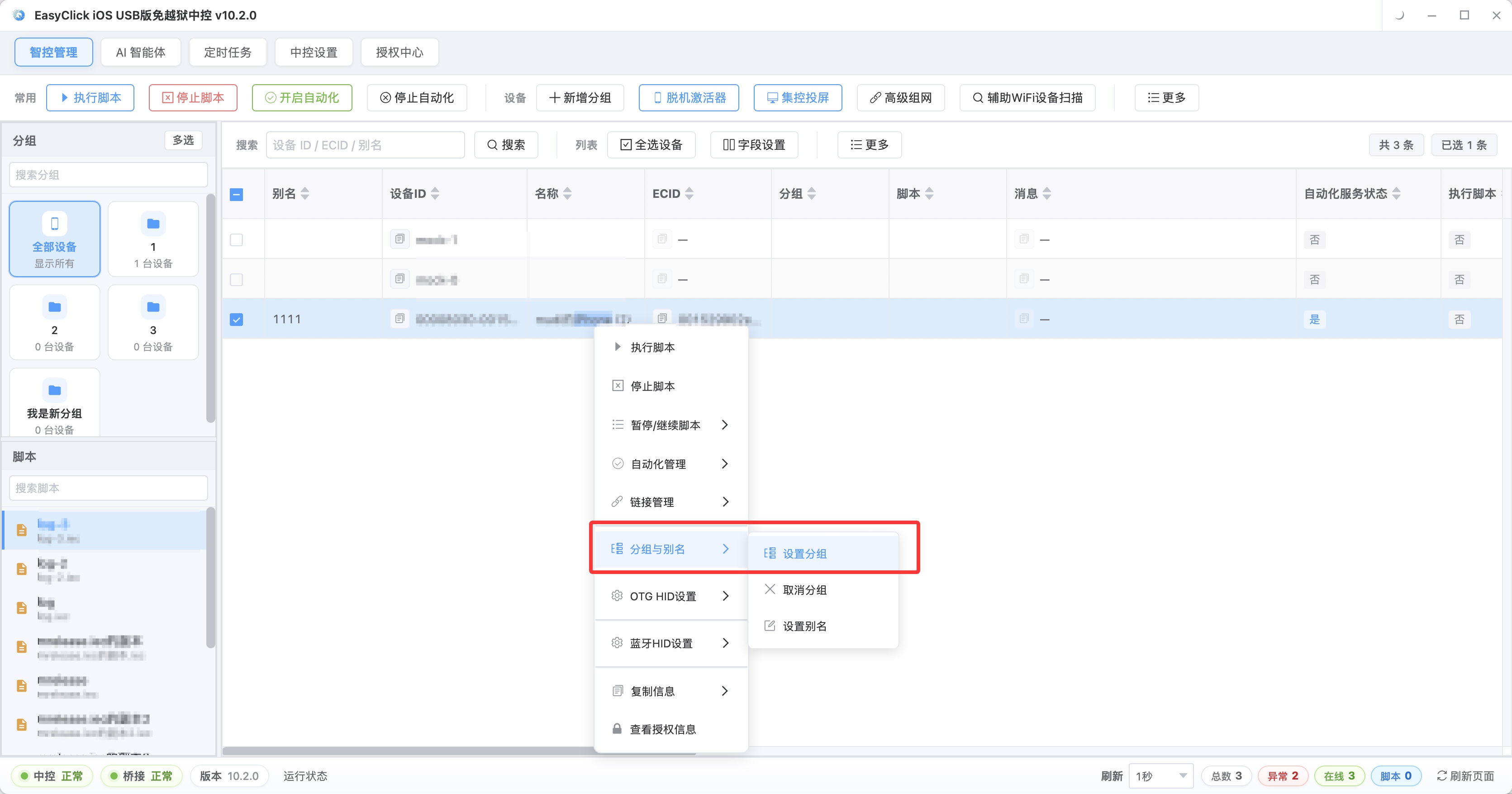
A device list arranged by purpose and group, like the one in the figure, is the base for drawing the isolation range when something happens. The earlier the groups are made, the faster the response.
Next, compare. Post the same batch of content to devices that have not had a problem. If it is normal, the problem leans toward the device or the network. If it is abnormal the same way, it leans toward the content or the operating pattern. If every device on the same network is abnormal together, it leans toward the network exit. If only part of them are abnormal, the problem is in the devices themselves. If devices whose configuration changed recently are more concentrated in the anomalies, the cause is most likely in that change. To make these comparisons, you need a group of untouched clean devices. Stopping everything limits the loss, and it also keeps that reference group. Keeping a small batch of “low-intensity accounts” in normal times is the same idea. They do not run much, and when something happens they are the control group you can still use.
Recovery has to go in batches
After the response, the recovery stage is where it is easy to have another incident. Opening everything at once releases the actions saved up during the response at the same moment, and the density will be higher than before the incident. Another round two hours after recovery is how that happens. The steadier method is three or four batches. The first batch releases only the few phones with the smallest impact and the steadiest weight, and you watch a full business cycle, such as a whole day. After you confirm it has not triggered again, release the second batch. Leave an observation window between each batch, and keep the operating density during recovery below what it was before the incident. If a batch shows an anomaly again, stop releasing volume immediately and go back to attributing by device. Rushing back to full load usually pays for a second incident. The cost of waiting two more days is generally lower than another round.
Three mistakes are especially common during recovery. Continuing to operate while you investigate destroys the clues entirely. If you have already judged that the configuration is the problem, and during recovery you replay the original configuration unchanged, that triggers it again, so the adjustment has to come with it. Someone also has to be assigned to look back at what this batch of devices changed in the last week: system, network, scripts, and task schedule. The root cause of many incidents lands on a change that looked unimportant.
Back to the call at the start. That seller said later that what he was most glad about was not rushing to touch anything. He still had a dozen or so clean accounts, and that group was what he used for the comparison afterward. Incidents like throttling are mostly some change accumulating past a platform threshold. They rarely happen all of a sudden. After an account returns to its previous exposure, you still need to know how it was triggered. Write the record during the response. Do not fill it in afterward. Keep at least four things: the time and the symptoms, the devices and accounts involved, the configuration and task state at the time, and which actions you took and what changed afterward. The next time it happens, that record is the only reference. The site has two other pieces on prevention and the boundary. Read them first: Apple cluster control anti-ban guide and How batch phone automation avoids risk control. The compliance piece is worth reading too: Phone cluster control compliance guide. However you deploy it, make sure the use itself is legal and compliant.
About EasyClick: A mobile automation script development platform covering three phone ecosystems: Android without root, iOS without jailbreak, and HarmonyOS. It also offers Apple script writing, Apple cluster control, Android cluster control, remote cloud control, and AI phone cluster control. → Explore all products
Ready to build it for real?
Every approach in this article can be built on the EasyClick phone automation platform — full documentation, developer tools and cluster/cloud-control products, free to try.