Cloud control puts the management side in the cloud. When devices are in different places, they can still land in one web page, and script dispatch and data collection both finish in the browser. The cloud control in the docs runs on the server side, used to connect many devices, manage them in a web page, and also do remote screen mirroring, networking across sites, and remote operation. The matching versions are cloud control 3.11.0+ and EC client 9.4.0+. The demo site is http://ecloud.devicefarm.cn/ , account test123 / test123, and this site does not allow adds, deletes, edits, or queries.
EC already includes the ability to talk to the cloud, and scripts call the interfaces directly. Each device has a unique ID. A task contains the device group to run, the execution time cycle, and the status. Parameters go down to the script together with the task. Data has two kinds: collections prepared in advance that the script needs, and results written back to cloud control after a run on the device. Interfaces can add, delete, edit, and query, and they can also append and reduce.
The execution order in the docs is: after the device ID, connect to the cloud; the cloud pushes the task to EC; EC loads the script file and starts the script; the script uses ecloud.getTaskInfo() to fetch task information and parameters, then runs; during the run it adds, deletes, edits, and queries data. What the developer does is assign device IDs and watch the two steps of fetching the task and reading and writing data. EC handles the rest. Only the debug build and the enterprise build can communicate with cloud control.
Where the two deployments differ
Phone batch management commonly uses two connection methods.
Local console: the phones and the computer are on the same network, and the software is installed on the computer. Data stays inside the LAN, and latency is the lowest. Cloud control system: phones connect to a cloud platform, and a person somewhere else manages them with a web page or a client. Location is unrestricted, and the scale ceiling is higher too.
The links differ. Local is “computer → LAN/data cable → phone.” Cloud control is “phone → network → cloud platform → network → your computer.” There is an extra network segment in the middle, and the person and the devices can be in different places.
Whether data leaves the network, whether the software is installed locally or in the cloud, and whether management stops at the LAN or reaches any network, map to security, operations, and scale.
Cluster control means one computer controlling many devices in sync. A local console and cloud control are two deployments for doing that. Whichever you use now can be migrated later.
Item by item: where it is deployed, latency, scale, and security
| Dimension | Local console (USB/WiFi) | Cloud control system |
|---|---|---|
| Deployment location | Computer + LAN | Cloud platform |
| Management method | Local software | Web / client, any location |
| Latency | Lowest (LAN) | Depends on the network, generally acceptable |
| Scale ceiling | Limited by one computer and the network | No theoretical ceiling |
| Cost structure | One-time software + hardware | Platform service fee (often by volume) |
| Data security | Data stays on the internal network | Data passes through the cloud (encrypted in transit) |
| Suitable scale | A few devices to several dozen | Several dozen to data-centre scale |
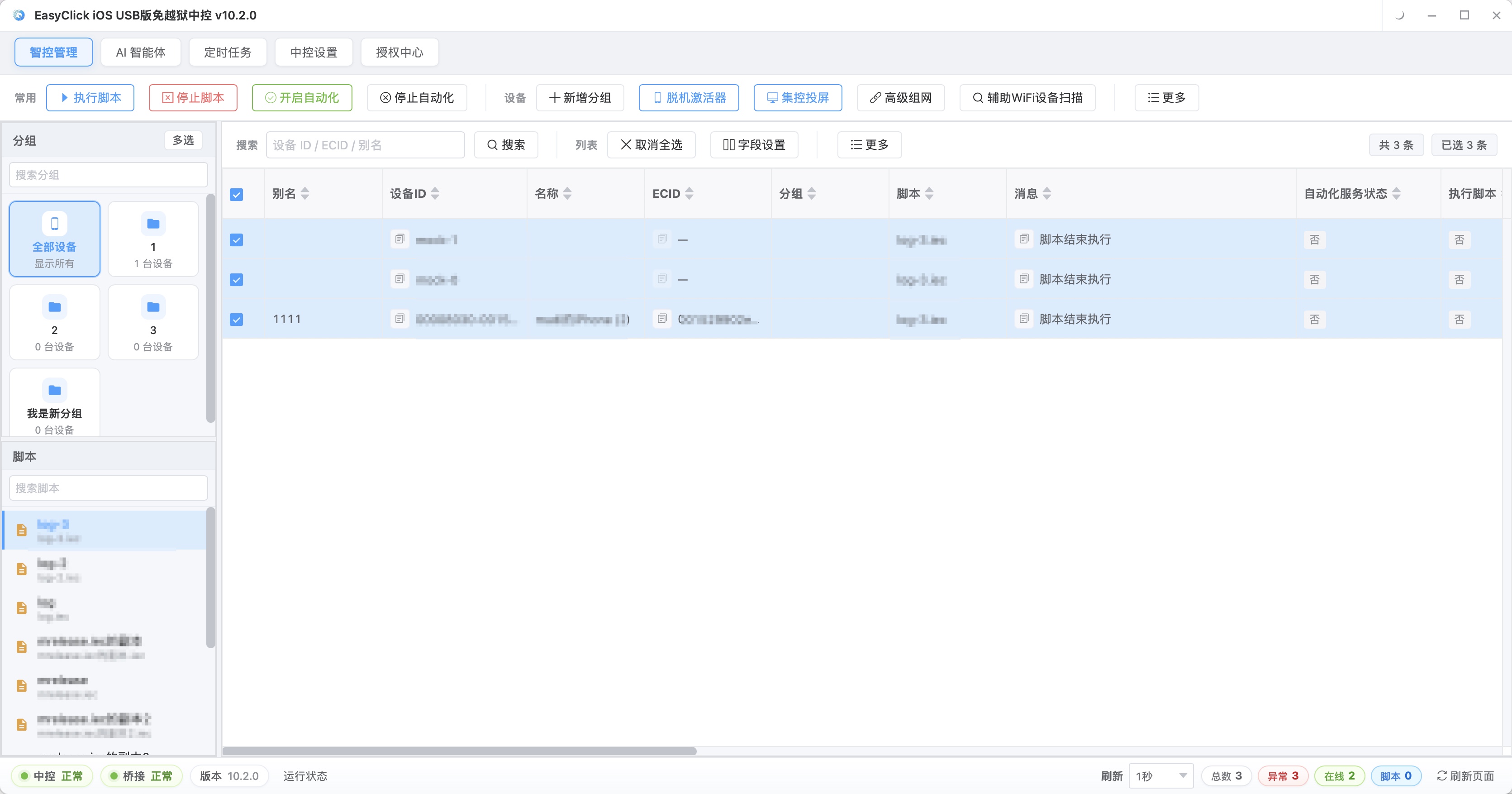
The screen above is the EasyClick local console. The top navigation can switch to the AI agent, the workflow editor, and scheduled tasks. The left side is the device group tree, which can be split by business line or by region. The middle is status cards for online devices.
This connection method has very low latency, and data stays on the network. One computer on a USB hub can control dozens of phones at once, and the mirrored picture is close to zero latency. When the team is split across several cities, or the phones are running in a remote room, put the control side in the cloud.
The computer side differs too. A local console is tied to one computer that stays on. After shutdown, management stops, and a computer failure stops the whole console. Cloud control’’s management side is in the cloud. The computer is only a client, and logging in on another machine restores it.
Latency follows the link. A LAN is in the millisecond range, and real-time mirroring is smooth. On the public network, a person watching the screen and tapping can feel the delay. Batch tasks are barely affected. Split your own work: how much is a person watching the screen and tapping, and how much the script runs on its own. Batch business is mostly the latter, and cloud-control latency is generally enough.
Scale is stuck on one computer’’s USB ports, WiFi bandwidth, and performance. Growing means adding console computers, and how devices are divided and how tasks are coordinated has to be designed separately. Cloud control is managed as a platform, and expansion is generally access and configuration.
Data staying on the internal network the whole way is the local case. Cloud control passes through the cloud. Reputable setups do encrypted transmission and permission tiers, and the fact that the data sits in someone else’’s room still has to be evaluated on its own. If cloud control supports private deployment, the cloud portion can be installed on your own servers.
Deployment steps, cost, and how to handle it
A local console follows this order: prepare the computer, install the software, connect through a USB hub or WiFi, authorise device by device, then verify in bulk. When the device count is large, prefer a powered hub, and the network has to be stable.
Cloud control is: devices connect to a gateway or client, register on the cloud platform, configure groups, then verify with a remote dispatch. The extra piece is the platform account and permissions.
| Cost item | Local console | Cloud control system |
|---|---|---|
| Software / service | One-time licence | Platform service fee (by volume / by tier) |
| Hardware | Computer, hub, network gear | Device access gateway (if any) |
| Incremental cost | Low (adding devices barely adds money) | Grows with device count |
| Team cost | On-site operations | Remote operations, friendly to other sites |
Few devices, gathered in one place: local is usually cheaper. Large counts, spread out: the cloud-control bill is often easier to calculate. If the team mainly wants to manage from anywhere, cloud control can still be the choice at a modest scale.
Few people, devices together, sensitive data, such as a test team: use a local console. Data stays on the network, latency is low, and the fee is paid once.
Devices scattered across sites, a scattered team, and operations by scale: use cloud control. People do not have to stay next to the devices, and adding devices does not mean buying another console computer for every expansion.
If you need both, core devices go local and expansion devices go to the cloud. Mature setups support this hybrid. Both access methods have to enter the same management screen, and tasks have to be dispatched together. If that cannot be done, a hybrid becomes two systems running side by side.
Five questions, migration, and places that are easy to misjudge
Go through these five questions first:
- Are the devices gathered or scattered? Scattered points to cloud control.
- Can the data leave the internal network? If it cannot, choose local.
- Will the scale expand quickly? If it will, choose cloud control.
- Is latency sensitivity high? If it is, choose local.
- Is the budget one-time or monthly? Match it to the cost structure above.
One more item is easy to miss: where the operators are. A local setup needs someone on site, or at least able to enter the internal network. Cloud control can be operated remotely. With no dedicated operations staff, and devices scattered in several places, remote operations removes that on-site labour.
Moving from local to cloud control starts by connecting a small number of devices on the cloud platform, running them in parallel with local, and checking scripts and task logic. They usually do not need a rewrite. Then connect the remaining devices by group and watch for a while. After it is stable, turn the local console off, or keep it as the local part of a hybrid.
Moving from cloud control back to local follows a similar order. Common reasons are a shrinking business, or tighter data compliance.
Moving every device at once, then rolling the whole batch back when something goes wrong, is expensive. Gray-release by group, and a problem only affects the current group.
Take stock of assets before the move. The device list should record model, system version, and licence status. The script list should record which local capabilities they depend on. The task list should record scheduled tasks and alert configuration. If a script hard-codes an interface that only the local console has, mark it separately.
Security looks at who manages the data, how encryption is done, and how permissions are controlled. Cloud control often starts lower, and the fee grows with scale on the service charge. Small scale, devices gathered: local is cheaper. Scattered and large: cloud control can cost less.
A local console can also use intranet penetration for remote access, and the deployment and maintenance cost is higher than cloud control’’s ready-to-use setup. A mature hybrid puts both access methods on the same platform, with one management screen.
Latency mainly affects a person watching the picture and tapping in real time. Batch dispatch, scheduled tasks, and script execution are insensitive to latency. When the devices are all in one room and the data is sensitive, local or privately deployed cloud control is the better fit. Look at data flow first, then whether people and devices are in the same place, and device count last.
Further reading: EasyClick local console (iOS USB mirroring, iOS wireless mirroring) and the cloud control system are described in detail on the official site.
About EasyClick: A mobile automation script development platform covering three phone ecosystems: Android without root, iOS without jailbreak, and HarmonyOS. It also offers Apple script writing, Apple cluster control, Android cluster control, remote cloud control, and AI phone cluster control. → Explore all products
Ready to build it for real?
Every approach in this article can be built on the EasyClick phone automation platform — full documentation, developer tools and cluster/cloud-control products, free to try.