Apple cluster control means one computer managing many iPhones at once: view the pictures in one place, dispatch tasks by group, and collect results together. The mainstream implementation is no-jailbreak.
After no jailbreak, where the picture comes from
Early batch control of iPhones basically required a jailbreak. After the jailbreak you installed plugins, system permission was fully open, and the cost was losing the warranty, poor stability, breaking on every iOS upgrade, and high security risk. The mainstream setups in 2026 are no-jailbreak. They use Apple’s official mirroring protocol, or HID injection at the USB protocol layer, and they do not touch the system. AirPlay, screen mirroring, and USB direct display are official Apple features. What automation has to do is connect those capabilities and add control commands. The device is still a normal iPhone, and an operations team can control phones in a batch with this flow.
In one complete no-jailbreak batch operation, the picture is the first step:
Device picture → mirror to the computer → a person or a script reads the state → send a command → the device runs it → the updated picture confirms itWithout mirroring, the script does not know which screen the device is on, and it does not know whether the action took effect, so it cannot judge state. With a picture, you can see the current screen and check the result of an action.
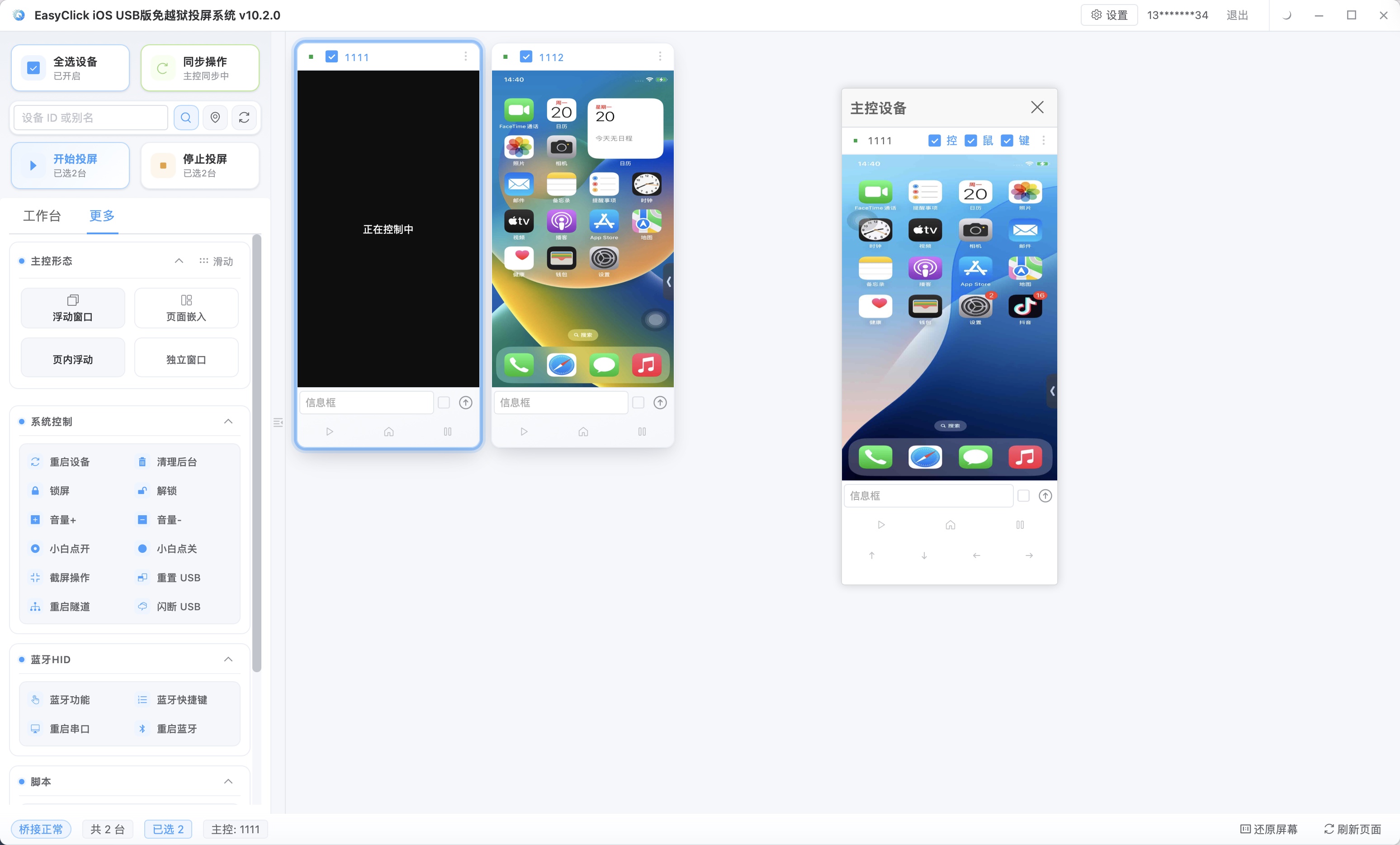
Four setups, how they work, and a measured comparison
The first two only mirror and do not control. The last two can both see and control. USB HID replaces the picture with a separate screenshot channel and no longer depends on screen mirroring:
| Setup | How it works | Latency | Stability | Can it control | Where it fits |
|---|---|---|---|---|---|
| Built-in system mirroring (wireless) | AirPlay to a Mac | Medium | Medium | View only | Meeting demos, personal use |
| Wired mirroring (Lightning/Type-C) | Direct USB, video stream on the cable | Lowest | High | View only | Livestreams, low-latency display |
| Protocol-level no-jailbreak screen control (agent mode) | Mirroring protocol + control commands sent back | Low | High | Mirror + control (needs signing) | Automation testing, batch phone control |
| USB HID hardware-free screen control | Separate screenshot channel for the stream + HID to inject commands | Low | High | Mirror + control (no signing, no extra hardware) | Low-cost batch phone control, risk-control-sensitive cases |
The first two only mirror and do not control. The last two, on top of the picture, send taps, swipes, and input back to the phone. Automation and cluster control depend on that step. The picture in agent mode depends on the agent program and the mirroring protocol. USB HID replaces the picture with a separate screenshot channel. Built-in system mirroring (AirPlay) encodes the picture over Wi-Fi and pushes it to a Mac. Wireless is ready to hand, it is affected by network swings, and it can only view, not control. Wired mirroring connects directly over Lightning or Type-C, the picture travels on the cable, there is no Wi-Fi interference, latency is the lowest, and picture quality is the steadiest. Low-latency livestream cases use it often, and it can also only view, not control. Protocol-level no-jailbreak screen control (agent mode) takes the stream and, through system capabilities, sends control commands to the device at the same time. Picture and control share one path, and the cost is a signed IPA. USB HID hardware-free screen control gives control to HID injection at the USB protocol layer and gives the picture to a separate screenshot channel. Neither depends on screen mirroring. With no app installed, signing is not involved. With no development board, no extra hardware is needed.
The mirroring protocol has an encoding layer and a transport layer. The encoding layer encodes the screen as an H.264 or H.265 video stream. Resolution, frame rate, and bitrate decide picture quality and bandwidth. On the transport layer, wired uses USB, the data is stable, and packets are not lost. Wireless uses Wi-Fi and is affected by channel, interference, and bandwidth contention. Wired latency is low because transport is on a cable, and the remaining variables are mainly encoding and decoding.
You can measure the four setups yourself:
| Setup | How to measure | What to watch |
|---|---|---|
| System mirroring (wireless) | Play a video and watch the delay | Whether sound and picture stay in sync, how often it stutters |
| Wired mirroring | A stopwatch, or a high-speed burst of the picture plus the phone screen | Delay of the picture relative to the phone |
| Protocol-level screen control | Send one tap and watch the picture respond | Command round-trip delay, success rate of the action |
| USB HID screen control | Take a screenshot stream + send one tap | Screenshot time, tap response, stability over a continuous run |
On a normal LAN, wireless mirroring can reach a smooth level, and wired can reach the millisecond range. The actual numbers depend on the hardware and the network. Measure in the target environment before you deploy.
Where latency comes from, and how to set the parameters
Where latency comes from: a stretch of picture goes from the phone to the computer through five steps, capture → encode → transport → decode → display, and each step adds latency.
| Stage | What affects it |
|---|---|
| Capture / encode | Encoding ability on the device, resolution and frame rate |
| Transport | Cable (wired), or Wi-Fi bandwidth and channel (wireless) |
| Decode / display | Computer CPU and GPU, display refresh rate |
A wired setup drops the swing of wireless transport, so latency is the lowest. Wireless adds one network hop. Whether it is usable depends on three things: the time from sending an action to the picture showing a response, whether the picture stutters, tears, or turns into blocks, and whether several hours of continuous mirroring drops the connection or the latency keeps getting worse. Frame rate and resolution only need to be enough for the case:
| Case | Suggested parameters | Why |
|---|---|---|
| Batch inspection (status only) | Low resolution + low frame rate | The picture changes little. Save bandwidth and decode resources |
| Remote operation (frequent interaction) | Medium resolution + medium-high frame rate | Actions feel more responsive |
| Livestream / demo (shown to others) | High resolution + high frame rate | Appearance comes first, and high bandwidth use is acceptable |
When many devices are mirrored at once, drop each stream one notch and the overall load drops with it. If mirroring stutters as soon as there are many streams, cut here first.
USB HID separation, batch control, and mistakes
The picture in the first three setups depends on screen mirroring, and control needs that picture as its basis. USB HID splits the two. Control uses the USB protocol layer: the central-control computer pretends to be an HID peripheral (keyboard and mouse) and injects touch and key events into the iPhone over a USB cable. The device installs no app, needs no signing, and is not jailbroken. The system treats it as a real external keyboard and mouse. It supports single tap, double tap, long press, swipe, three-stage touch, multi-point path replay, text input, system keys (home, multitasking, lock screen), and volume and clipboard read and write. The central control on this path is EC iOS USB 10.7.0 (2026-09-08). It does not use Bluetooth and does not use an OTG board, and it cannot be mixed with Start automation on the same phone. The picture uses a separate screenshot channel, in two modes by where the picture comes from:
| Mode | App on the phone | Picture source and traits |
|---|---|---|
| No-automation screenshot + USB_HID | Not needed | Picture from a separate screenshot channel, plug in and use, no signing |
| Main-program screen recording + USB_HID | Needed (offline main program IPA) | A smoother picture, plus screen recording |
Both modes require iOS 17 or above on the phone. Screen mirroring is behavior that can be observed. A separate screenshot drops that signal. The mode with no app installed does not use a development board and does not need a signature maintained for it. The extra hardware per phone is one cable. Control does not depend on whether an agent program is running, so there is one fewer point where a crashed program means you cannot control the phone. The main-program screen-recording column needs the offline main program IPA installed. On iOS 15 and above, offline main program v7.2.0 and above can serve as the USB automation program. The official download page has a pre-signed IPA for testing. Below iOS 15 it does not apply. The offline edition supports iOS 15 and above only. From 7.0.0, a single app installs only the main program, and a dual app also installs an agent IPA. Further reading: How USB HID reshapes Apple cluster control: a technical jump with no signing, no jailbreak, and no extra hardware.
No-jailbreak batch control has to string five stages together. Connection: iPhone or iPad joins the central control over a cable or Wi-Fi. Picture: the official mirroring protocol, or the USB HID separate screenshot channel. Control: taps, swipes, and input sent back, with batch sync dispatch. Signing: agent mode needs signing, and the USB HID mode that installs no app does not. Tasks: scripts run in a batch, on a schedule, with recovery from exceptions. The picture is only one of those stages.
| Stage | No-jailbreak setup | Jailbreak setup |
|---|---|---|
| System integrity | Left intact | Broken |
| Warranty | Kept | Void |
| iOS upgrade compatibility | Official protocol follows the system | Plugins lag and fail easily |
| Stability / security | High | Medium to low |
When many devices are mirrored at once, picture data stacks stream by stream. More streams ask more of bandwidth and decode resources. The USB bus (wired) or the Wi-Fi channel (wireless) becomes the bottleneck. Day to day, take the picture only from the devices that matter, and open the full set when you need it. A full inspection uses a low-resolution, low-frame-rate stream. When bandwidth is tight, split across several hubs or several computers. From one phone to cluster control can be four stages: first get the picture and control working on one device; then go to 5 to 10 phones, watch how multi-stream mirroring affects the computer and the network, and write the bandwidth down; then plan hubs, network, and central-control scale from the pilot numbers; finally tune parameters by task and stagger the high-bandwidth tasks. After one path is stable, copy it to more phones.
A quick selection table:
| Business need | Recommended setup | Reason |
|---|---|---|
| Demo only, personal viewing | System mirroring (AirPlay) | Wireless and ready to hand, no extra deployment |
| Livestream, low-latency display | Wired mirroring | The picture travels on a cable. Lowest and steadiest latency |
| Automation testing, batch phone control (capability first) | Protocol-level no-jailbreak screen control | View and control in one, with nodes, photo library, and other capabilities complete |
| Batch phone control (cost and no signing first) | USB HID hardware-free screen control | No app, no signing, no development board |
When you buy a setup, ask first whether it can control. Mirroring only solves seeing. Controlling the screen also needs commands sent back. The USB HID picture uses a separate screenshot channel, does not depend on screen mirroring, and drops one mirroring behavior. Wired mirroring plus a hub and a central control can also connect in a batch. Watch bus bandwidth and power. Wireless without a network plan stutters when Wi-Fi channels are crowded and bandwidth is taken. A low instant latency still leaves a several-hour run unproven. A long unattended run has to be measured. Building only the mirror, and ignoring how devices connect, what the device side can carry, and how work is scheduled, leaves you with a picture and still unable to do batch automation.
About EasyClick: A mobile automation script development platform covering three phone ecosystems: Android without root, iOS without jailbreak, and HarmonyOS. It also offers Apple script writing, Apple cluster control, Android cluster control, remote cloud control, and AI phone cluster control. → Explore all products
Ready to build it for real?
Every approach in this article can be built on the EasyClick phone automation platform — full documentation, developer tools and cluster/cloud-control products, free to try.