A phone automation script is a program that replaces repeated manual work on a phone. The usual way to find a target is image and color matching, OCR, and coordinate taps.
Four paths, and where each one sits
Phone script platforms usually fall into these four paths.
| Platform | Form | How you program | Strength | Limit |
|---|---|---|---|---|
| AnJian | Personal tool | Visual + script | Quick to start, many tutorials | Weak complex logic, weak iOS support |
| TouchSprite | Personal tool | A script language | Stable on Android scenarios | A relatively closed ecosystem |
| Auto.js | Open-source tool | JavaScript | Flexible, free | Some versions no longer updated, no enterprise support |
| EasyClick | Professional platform | JavaScript + visual tools | No root / no jailbreak, iOS / Android / HarmonyOS covered, enterprise batch | There is a learning curve |
AnJian is built for starting with no background. Visual recording can produce a script that runs in a few minutes, and there are many tutorials. What you record is mostly coordinates and fixed timing. It breaks when the UI changes. Data handling and branches are hard to write, and iOS is basically unusable. TouchSprite is a long-standing Android script tool. Its script language is stronger than AnJian’s, and it has some accumulation on batch scenarios. The ecosystem is fairly closed. iOS and HarmonyOS support is limited. It sits close to a more advanced AnJian. Auto.js is open source and free, uses JavaScript, and suits people who already program. Some versions have stopped being updated. Compatibility with new Android versions and with HarmonyOS is not guaranteed, so a long-running project has to carry the adaptation itself. EasyClick covers Android without root, iOS without jailbreak, and HarmonyOS Next at the same time. Scripts are mainly JavaScript, there is also a visual IDE, and it includes a local console, Apple cluster control, cloud control, and packaging and distribution. It does more, and the learning curve is steeper than a single-purpose tool.
AnJian and TouchSprite are for individuals writing scripts. Auto.js hands JavaScript to developers to change themselves. EasyClick manages several systems at once, and does batch management.
Capability comparison, and which scenario fits
| Capability | AnJian | TouchSprite | Auto.js | EasyClick |
|---|---|---|---|---|
| Android without root | Supported | Supported | Supported | Supported |
| iOS without jailbreak | Weak | Not supported | Not supported | Supported |
| HarmonyOS | Not supported | Not supported | Not supported | Supported |
| Batch cluster control / console | Basic | Basic | Not supported | Supported |
| Cloud control | Not supported | Not supported | Not supported | Supported |
| Enterprise packaging and distribution | Limited | Not supported | Not supported | Supported |
| Maintenance | Actively maintained | Update pace is ordinary | Some versions no longer updated | Actively maintained |
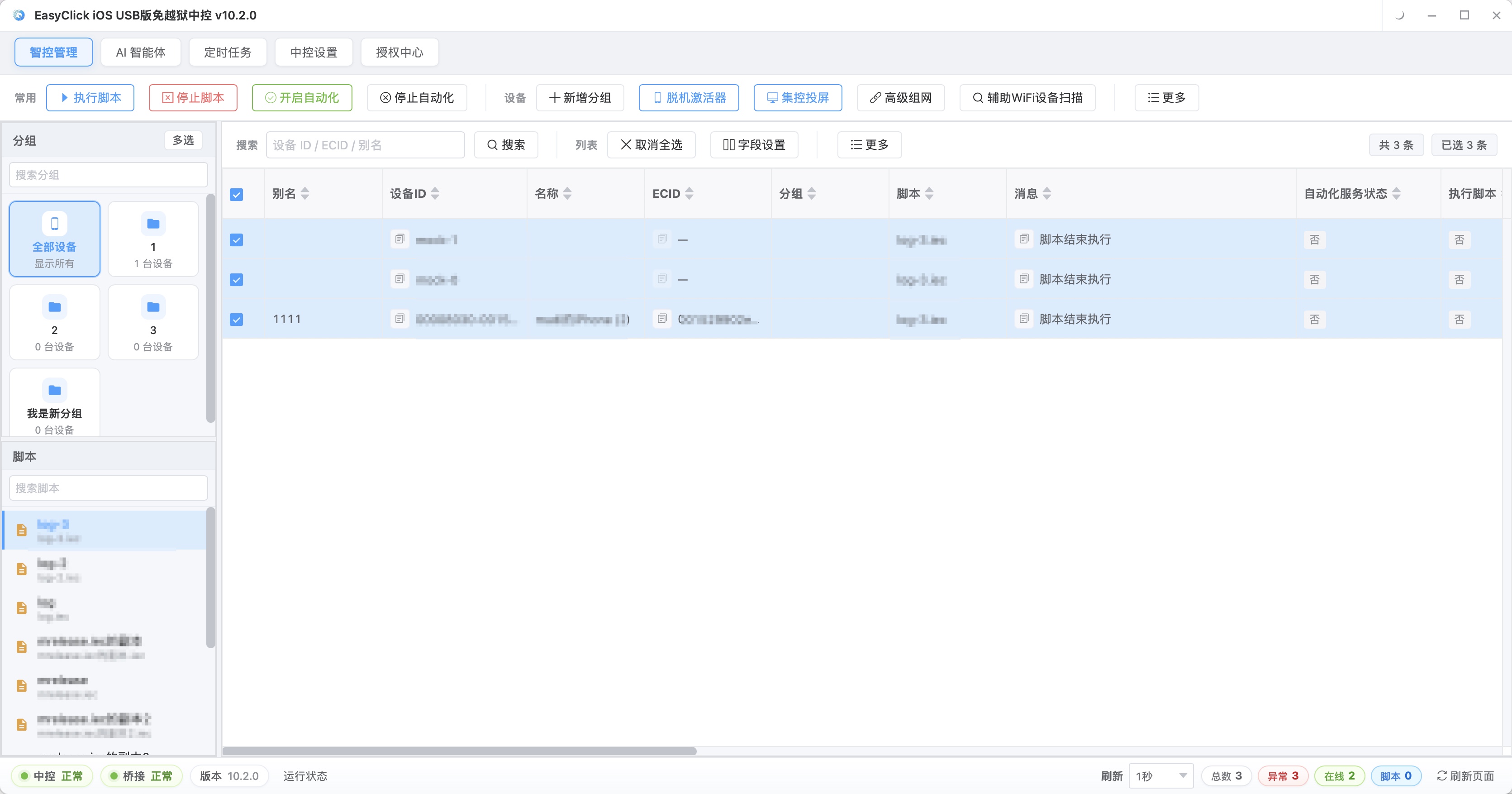
The difference is largest in batch management: groups on the left by platform or business line, dozens of devices in the middle with live mirroring and run status, a whole group selected so one script task goes out together, and each device’s success rate and duration visible. AnJian and TouchSprite cannot mirror many devices at once. Auto.js stays at single-device automation. Those gaps come from the platform’s stack and the scale of investment. Adding one feature does not fill them. For Android-only, single-device scripts, Auto.js and AnJian are enough. The moment the work touches any one of iOS, HarmonyOS, batch, or distribution, the evaluation has to change.
For a small personal script, such as an alarm, a check-in, or an auto-tap, AnJian’s visual recorder is the fastest. Thirty minutes is enough to get started. A developer doing Android automation can look at the Auto.js JavaScript ecosystem, and should pick a version that is still maintained. Long-term maintenance means debugging, version management, and compatibility across models. Handing it to someone else also means packaging and distribution. A company managing many devices and several systems needs batch management, device onboarding, script distribution, and stability. On the EasyClick side that is Android without root, iOS without jailbreak, and HarmonyOS Next, dozens of devices managed from one computer, offline scripts, batch task dispatch, result collection, plus packaging, distribution, and device onboarding. An individual developer taking side jobs needs packaging and distribution most: pack the script into an app the customer can run. A team moving from a script tool into an automation service needs batch management, remote operations, and task scheduling. A tool-style platform hits its ceiling quickly. Personal experiments care about how fast you can start. Long projects care about maintenance cost. Batch business cares about management capacity.
When you choose, check these: whether you need to control iOS, and if you do, drop Android-only tools and pick a no-jailbreak option; whether you need to control HarmonyOS, and if you do, confirm the platform has a HarmonyOS adaptation; whether you need batch cluster control, and if you do, confirm batch management and stability; whether you need enterprise distribution, and if you do, confirm signing, packaging, and remote deployment; whether the team can program, and if they can, prefer JavaScript, and if they cannot, prefer visual tools. Then run a real script on a real device, and simulate one batch dispatch. Half an hour of testing is more useful than ten reviews. Personal use can rely on community docs. For company use, write how official support responds into the evaluation sheet.
Migration, and a few common mistakes, need their own look.
Moving from a visual platform such as AnJian or TouchSprite, coordinates and fixed timing in a recorded script cannot be reused directly. The business logic has to be rewritten, and the business flow can stay. You can change coordinate targeting to control targeting, and fixed waits to conditional waits, while you are there. After the move it is often steadier. Moving from a JavaScript platform such as Auto.js costs much less. Loops, conditions, and data handling can be reused for most of it. The main change is the API layer, such as finding elements, tapping, and waiting. Do it in two steps: get the core flow running, then add error handling and batch adaptation. Both paths start with an inventory. Split existing scripts into four groups by business value and how hard they are to reuse. Move the high-value, easy ones first. Drop the low-value, hard ones and rewrite. The steps are: list the scripts, sort by importance, move the high-frequency core scripts first, verify on one device, verify in batch, run old and new in parallel, then switch. The script style and the APIs change, so the team has to learn again. When you estimate, count learning time and time spent on mistakes, along with the code move.
A few common judgments pull the choice off. Free tools are cheap to learn, and batch, cross-system, and distribution take a separate investment. Being able to see the code does not mean someone keeps maintaining it and adapting it to new systems. Look at who will maintain it over the next three years. No-root and no-jailbreak are already the ordinary practice on this kind of platform. Flashing and jailbreaking bring stability and compliance trouble. More features cost learning time and complexity. A review can only tell you which options exist. It cannot answer whether your devices will run, or whether your scale will hold. A script that runs is the start. You also need the failure rate over a week of continuous running, whether a disconnect can recover, and whether it still works after a system upgrade. A large user base only means a lot of people use it. Device type, batch scale, and what the team can do are what line up with the choice. Price and fit have no fixed relationship. Inside the budget, pick the one whose capability matches.
Related reading: For the full capability comparison, see the product overview and the docs site script development docs.
Deeper single-brand comparisons and alternative guides:
About EasyClick: A mobile automation script development platform covering three phone ecosystems: Android without root, iOS without jailbreak, and HarmonyOS. It also offers Apple script writing, Apple cluster control, Android cluster control, remote cloud control, and AI phone cluster control. → Explore all products
Ready to build it for real?
Every approach in this article can be built on the EasyClick phone automation platform — full documentation, developer tools and cluster/cloud-control products, free to try.