Apple cluster control is a plain idea: one computer is the controller, and work that used to be tapped by hand, phone by phone, becomes one dispatch and a batch run. The iPhone itself does not need a jailbreak. In recent years, eight out of ten people who ask about Apple cluster control circle back to the same question: if I cannot write scripts, does that mean I cannot do this? Cluster control sounds like a device problem. What actually stops most people is the script. The devices are bought, the console is installed, the phones are recognized, and then what? Where to tap, how long to wait, and whether to retry when a step does not appear, all of that has to be written down before it counts.
If you cannot write scripts, does that mean Apple cluster control is off the table
You can do fewer things, and you can still do it. Without writing scripts, you can still use the console to connect dozens of iPhones to a computer, mirror the screens, group them, and start and stop scripts in bulk. Those are device-level jobs. They have nothing to do with whether you can write code. What gets stuck is the automation stretch. A script writes the judgment as a fixed rule: see this button and tap it, wait three seconds, and if it does not appear, try again. A person writes the rule, and a person has to change it.
iEasyRun takes that stretch. It is an AI workstation for phone automation. The software is completely free, it runs locally, and it does not need a server. You do not write code. You describe the job in plain language. It breaks the steps down and operates the phone.
The quick-start entry is: open “新中控.exe” in the install directory, confirm the phone is already connected in the console (the same way you mirror or run a script), then click “AI 智能体”. The console starts the background program. You do not start it yourself. You can drive an already connected iPhone in Chinese, or do batch work with a visual workflow. The targets include iPhone and iPad. Before you start, buy and bind a USB device license. The docs state that this is separate from the mirroring license. You also need the automation or Bluetooth environment ready. Interface automation steps need a signed IPA installed, and automation turned on. Steps whose names start with ble_ need Bluetooth or OTG configured. A large model is needed only for AI chat and for AI writing a flow. A trial run, and running a flow that is already saved, does not consume chat tokens.
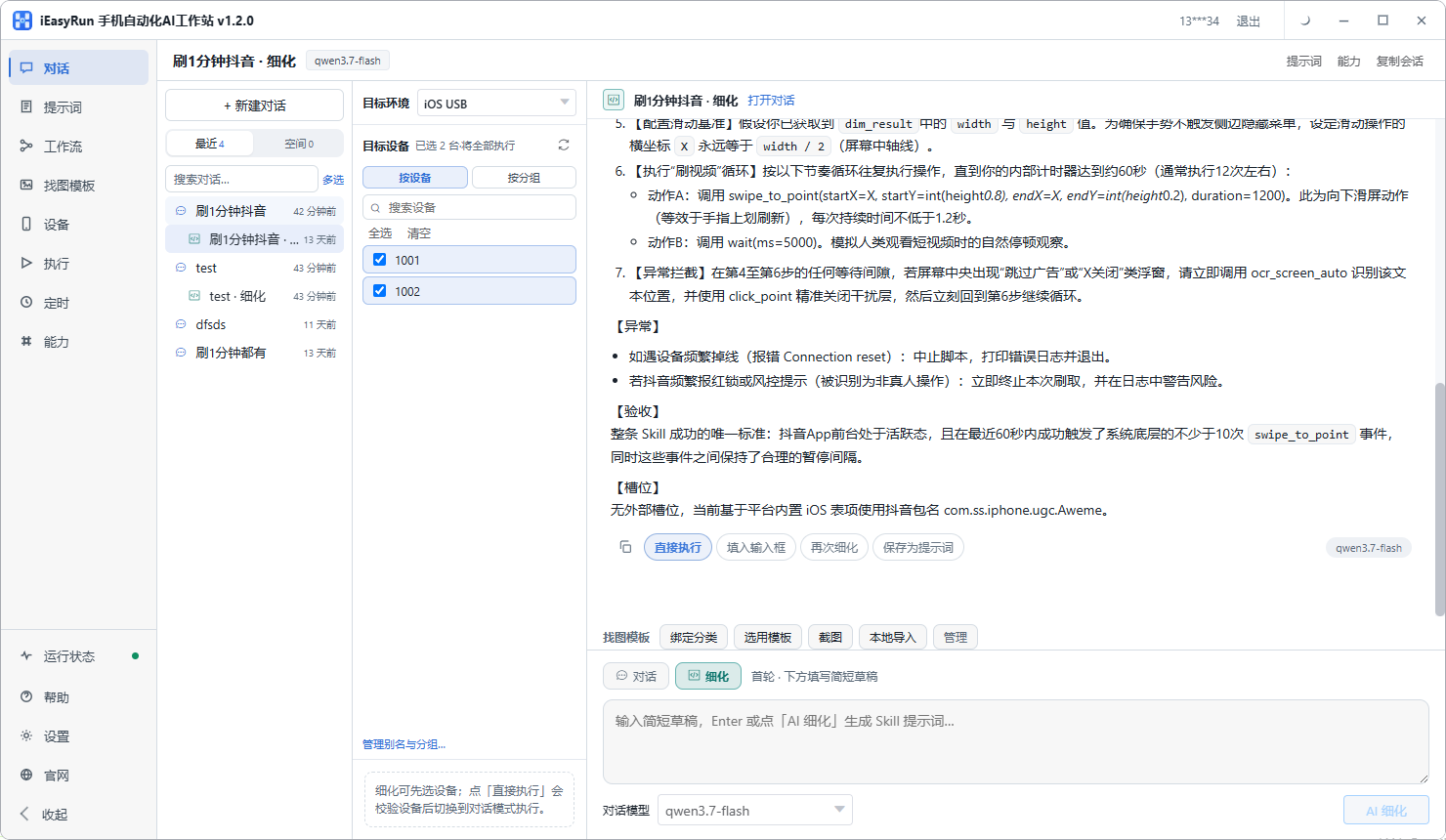
The picture is the chat page. Pick the target and the devices on the left, and type on the right, for example “change the auto-lock time on this batch of phones to five minutes.” It handles the breakdown and the execution. You do not write a line. Without a script, someone else does the tapping for you. With a script, the action can be the same every time.
Where the bar differs between the two kinds of tools, and what iEasyRun is like in use
Phone automation tools split roughly into two kinds. Script tools have a high ceiling. The finer you write, the more precise it gets, and the cost is obvious: you need JavaScript, image search, OCR, and control lookup, and it helps to keep a machine just for debugging. If the team has no such person, the script stays in the plan. AI-operated tools take a request, understand it, plan it, and do it. The bar is much lower. Speed and certainty do not match a hard-coded script, and cases that are stuck at milliseconds or pixels are hard. Changing them is different too. A script change has to be tested again, and enough changes can break another branch. On the AI side you usually state the new requirement clearly, and the next run follows it.
iEasyRun has three entries. Pick by how often the task repeats.
The lightest is chat. Scan the phones in on the Devices page, add them to the library, give them aliases, and group them. Only online devices can run. Then on the chat page, pick the target devices and describe the task in plain language. If the first description is unclear, that is fine. There is an AI refine mode that talks a fuzzy request into a step-by-step flow you can run, and then it starts.
Once it runs cleanly, save it as a workflow. A workflow has a canvas. You can arrange steps, pick devices for a trial run, and generate it together with the AI. The next time the same job comes up, pull it from the workflow library.
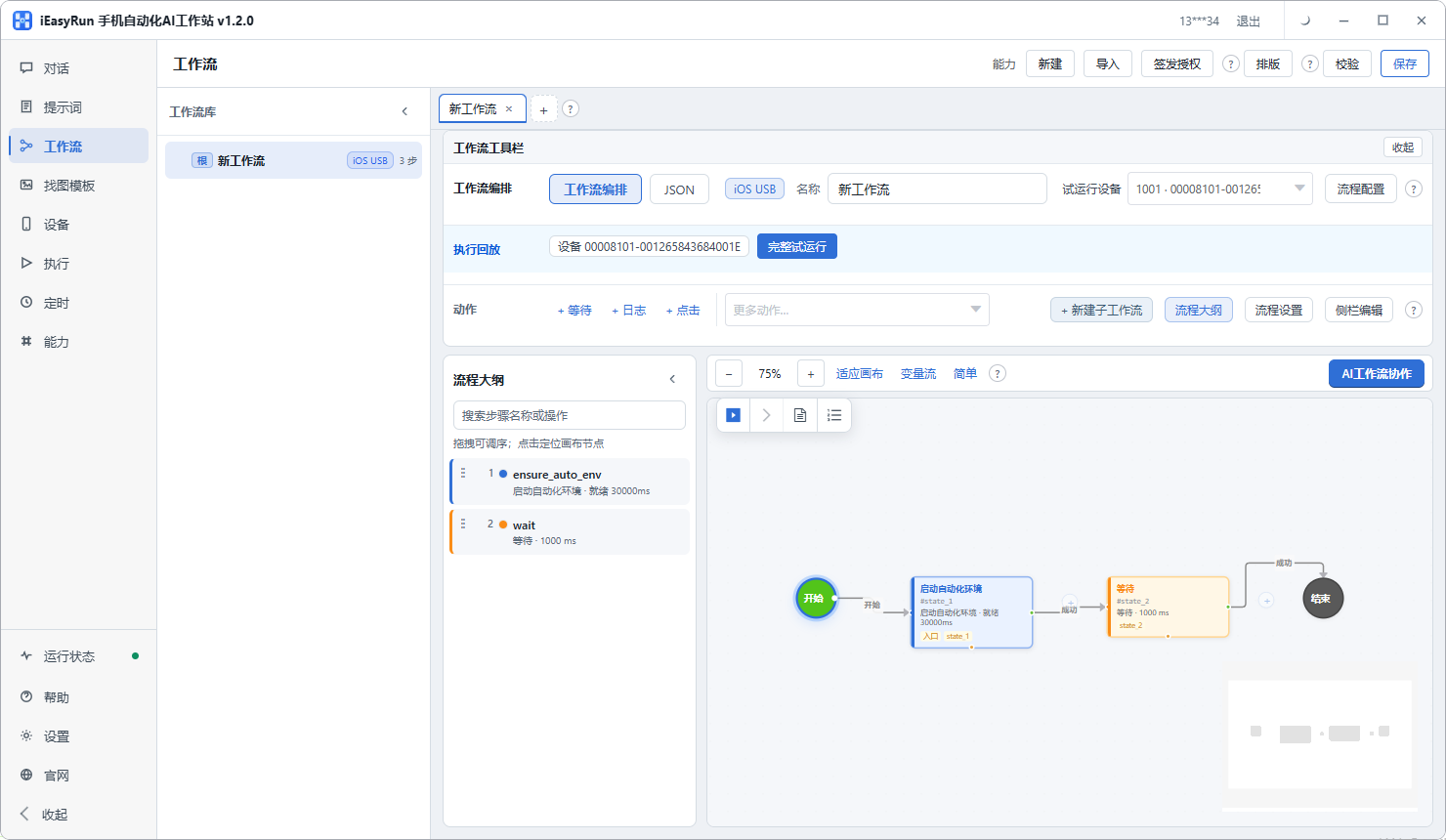
The canvas looks like the picture. The steps sit on one diagram.
There is also scheduling. A task can be set to run on a timer, as a scheduled chat or a scheduled workflow. Both are scheduled on this computer, so the workstation has to stay open. This is the step people skip: they set the timer and assume it will take care of itself, and the next day nothing ran. Check first whether the workstation is still open.
What it handles more steadily is work whose steps are not hard, and which is easier to describe in plain language: open an app and walk to a page, change a batch of settings, read text off the screen and fill it in somewhere else, find a batch of content by a condition and do the same set of actions. This kind of work changes a lot. A script has to lay out a pile of branches. Handing it to AI is less work.
What it struggles with is cases that need pixel and timing precision. Some in-game actions are ruined by one frame. That is still script territory: image and color search plus a fixed delay is steadier than a judgment made on the spot. There is another class it does not touch: jobs that require an account-strategy judgment. The fix is not in the tool. The tool can only carry out actions that are already decided.
A concrete example. Posting a batch of content to a batch of accounts: if each item only swaps the image and the copy, a script can carry it. If you decide whether to post a follow-up from how each item performed, that judgment is awkward in a script and more natural for AI. The first kind sends the image and copy you already prepared. The second has to look at the performance and then decide whether to post. That line does not stay fixed. Model capability changes, and a case that is hard today may be straightforward later. The more useful move is to try it on the highest-frequency task you actually have.
If you want to try it, start small. Do not connect dozens of phones on the first day. Install the workstation first. The entry is https://www.ieasyrun.com/docs/install , split into an iOS USB version and a wireless version. Android and HarmonyOS install guides are still being prepared. Use this one page. After install, scan one or two phones in on the Devices page and give them a memorable alias, such as “test-1”. Then go to the chat page, pick a small job you do every day and dislike doing, and let it run once. After it finishes, open the execution history and see what each step did, and whether anything errored. You can read that chain next to How an AI agent runs on a real phone. Once it is clean, save a workflow, then add devices. If you reverse the order, a large fleet makes it hard to tell which phone failed.
If the actions you have to do, and that do not need thinking, have piled up enough to annoy you, spend an afternoon trying it. Whether to adopt it, and which business it fits, can also be checked first with a self-test sheet.
More resources: iEasyRun site and install https://www.ieasyrun.com/docs/install , iEasyRun docs https://www.ieasyrun.com/docs , Apple cluster control overview https://ieasyclick.com/apple_qunkong/ , EasyClick developer docs https://ieasyclick.com/docs/ . Further reading: Apple cluster control with iEasyRun: a full plan for driving a batch of iPhones with AI, How to run Apple cluster control without a jailbreak.
About EasyClick: A mobile automation script development platform covering three phone ecosystems: Android without root, iOS without jailbreak, and HarmonyOS. It also offers Apple script writing, Apple cluster control, Android cluster control, remote cloud control, and AI phone cluster control. → Explore all products
Ready to build it for real?
Every approach in this article can be built on the EasyClick phone automation platform — full documentation, developer tools and cluster/cloud-control products, free to try.