HarmonyOS cluster control means one computer managing and batch-operating many HarmonyOS devices (HarmonyOS Next). It is the same class of tool as Android cluster control and Apple cluster control.
Why people are doing this now
After HarmonyOS Next landed, testing has to run HarmonyOS real-device compatibility, operations has to manage HarmonyOS devices in batches, and companies have to automate on HarmonyOS. HarmonyOS Next does not run Android apps, so the Android toolchain cannot be used as it is. Connection, mirroring, install, and scripts all have to be wired up again for HarmonyOS. Real-device compatibility testing, enterprise device management, and batch operations are already happening.
Device connection, mirroring, commands, batch install, and script execution are the same stages as Android cluster control. The difference is protocol, interfaces, and signing. Teams with Android cluster control experience mainly change the interfaces. Teams without cluster control experience should first get clear on how batch control connects, how commands go out, and how results come back, then look at the HarmonyOS interfaces.
Technical path and deployment points
| Stage | How it is done | Note |
|---|---|---|
| Device connection | USB / Wi-Fi into the central control | Similar to Android |
| Picture mirroring | Mirror to the computer through HarmonyOS mirroring | Needs a protocol adaptation |
| Command control | System automation API + accessibility-style interfaces | Native capability, no root |
| Batch install | Batch distribution and signed install of HarmonyOS app packages | Goes through the HarmonyOS signing system |
| Script execution | A script engine adapted for HarmonyOS | Syntax differs from Android |
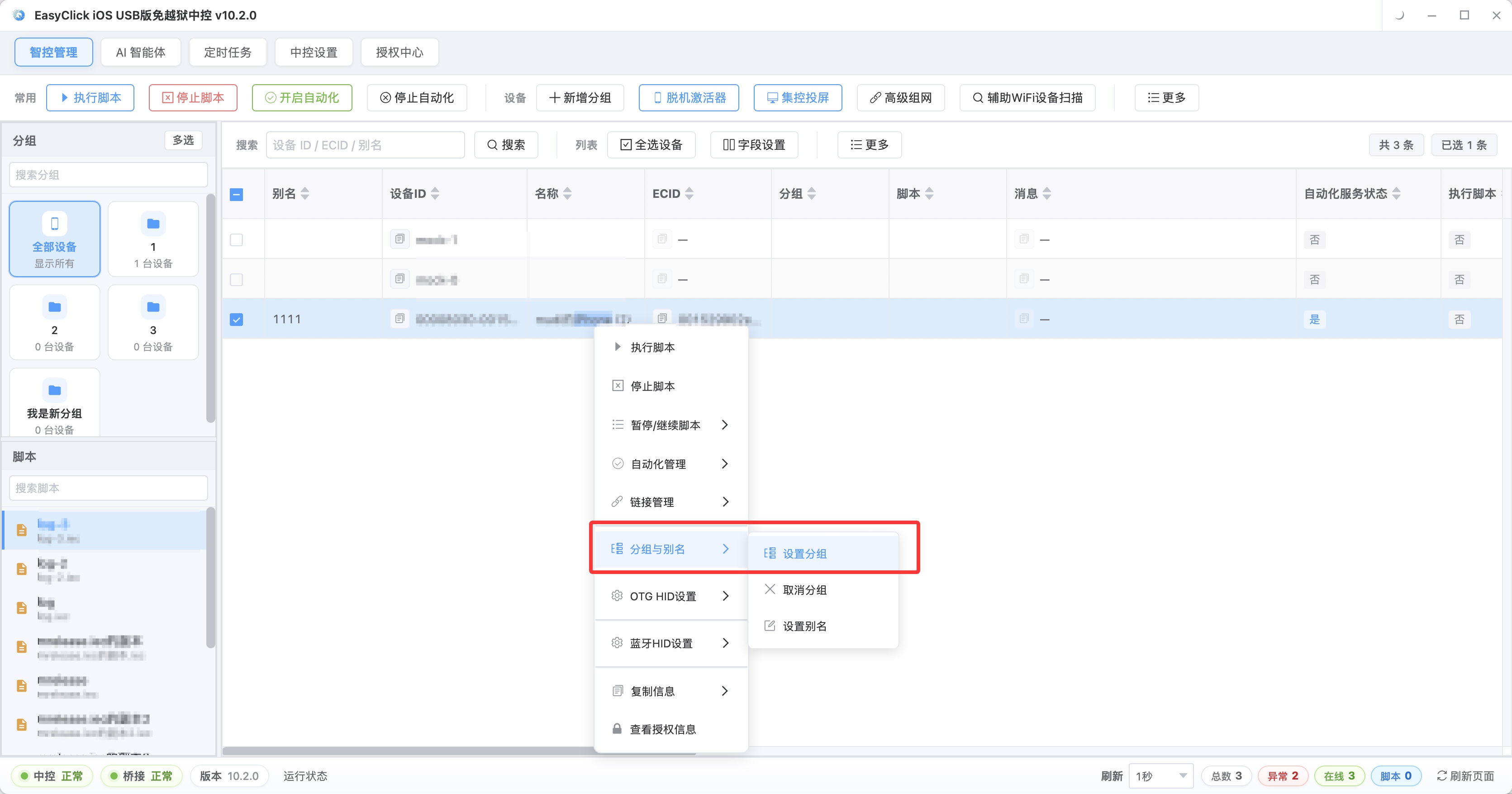
In day-to-day control, HarmonyOS devices can sit in the same central control as devices from other platforms. Group on the left by platform or business line, for example HarmonyOS test group and HarmonyOS operations group. In the middle, watch online status and battery for each phone, select the whole group, and send the same flow. Picture mirroring has to follow the HarmonyOS mirroring protocol. Measure the stability and latency of many phones mirrored at once. Commands go through the HarmonyOS system automation API and accessibility-style interfaces, with no root. Batch install goes through HarmonyOS signing. Confirm the signing method and how renewal works after expiry. The script engine has to use HarmonyOS wrapper interfaces. Mirroring working and install working still leaves the rest of the chain to check. When you evaluate, try connection, mirroring, commands, install, and scripts one by one.
A few points matter in deployment. For USB access, watch driver adaptation and concurrent connections from many devices, and give the hub enough power. For wireless access, put the HarmonyOS devices and the central control on the same network. WiFi quality directly decides how smooth the mirror is. For a mirroring load test, focus on picture latency and stability when many devices are mirrored at once. One phone looking normal still leaves many phones unproven. Support for mirroring and automation interfaces differs across HarmonyOS versions, so the load test has to cover the target versions. For the environment, set aside a HarmonyOS test area of its own: fixed devices, a separate network, and isolated accounts, managed apart from the Android and iOS device pools. Mix the three ecosystems in one pool and script dispatch, log collection, and result grouping all get messy.
How to develop scripts and how to migrate
The points in script development: whether the platform provides HarmonyOS wrapper interfaces for UI actions, element location, and system interaction; whether you can debug live, step through, and view the element tree; and whether the HarmonyOS sample scripts and docs are complete. Check candidate platforms against a list:
| Capability | Wrapper interface | Sample script | Debugging |
|---|---|---|---|
| UI tap / swipe / input | |||
| Element location | |||
| System-level actions (notifications, permissions) | |||
| Batch install | |||
| Screenshot / screen recording |
A blank column is a piece you have to build yourself. The more blanks, the slower it lands. Get device connection, the element tree, and log reporting stable first. If you can step through, you do not have to wait for the previous run to finish before you know where a script change went wrong.
When moving a script over from Android, business checks, loops, and data handling can stay. Taps, swipes, and input have to be rewired to HarmonyOS APIs, and element location has to be worked out again against the HarmonyOS UI. Most of the work is in those last two. First get open app, tap, and assert running, and confirm the interfaces work. Then fill in the business chain, branches, and exceptions, then do a batch check. Regress again after a system version update. What you need to prepare is HarmonyOS phones covering the target models and system versions, signing and distribution for batch install, and someone who has read the HarmonyOS interfaces, or a platform that already wraps them.
Differences, which teams it fits, and common mistakes
| Dimension | HarmonyOS (HarmonyOS Next) | Android |
|---|---|---|
| App ecosystem | HarmonyOS native apps | Android apps |
| Automation interfaces | HarmonyOS system API + accessibility-style | ADB + accessibility service |
| Script compatibility | Needs a HarmonyOS adaptation | Mature ecosystem |
| Toolchain maturity | Growing quickly | Very mature |
| Batch management demand | Rising quickly | Already saturated |
The checks and loops in Android scripts can be borrowed. Interfaces and element location have to be redone for HarmonyOS. Compatibility testing needs a HarmonyOS row in addition to Android and iOS. If the platform does not have a HarmonyOS adaptation yet, both the schedule and the cost have to be recalculated. The first time you write scripts and tune interfaces, and later system updates still need regression. That work is either done in-house or handed to a platform that has already connected HarmonyOS.
Several kinds of teams are already doing it. App testing needs compatibility and batch regression on HarmonyOS phones. Enterprise device management needs batch initialization, upgrades, and app installs. Operations needs batch tasks on the HarmonyOS side. MCNs and independent media need to publish on many HarmonyOS phones. When landing it, inventory devices and cases first and list the 3 highest-frequency batch tasks. When picking a platform, try it on real phones, and include many devices at once plus reconnect-after-drop in the load test. Get one task running on 3 to 5 phones, then expand, and watch the success rate by the week. A small team does not need a dedicated role. Leave 1 person on the testing side for the device pool and scripts, and 1 person on the operations side to work with the platform. Budget for a 3-to-5-phone pilot, then full coverage. Put version-compatibility regression into day-to-day operations.
The toolchain, signing, and scripts all have to be redone for HarmonyOS. A reskin will not run. If signing and distribution are not confirmed first, batch install gets stuck there. The HarmonyOS version span is wide, so the device pool needs older versions. Testing only new phones is not enough. Taking an Android quote and applying it directly will not match the HarmonyOS adaptation work. When you choose, look at whether the other side has HarmonyOS capability on real phones.
About EasyClick: A mobile automation script development platform covering three phone ecosystems: Android without root, iOS without jailbreak, and HarmonyOS. It also offers Apple script writing, Apple cluster control, Android cluster control, remote cloud control, and AI phone cluster control. → Explore all products
Ready to build it for real?
Every approach in this article can be built on the EasyClick phone automation platform — full documentation, developer tools and cluster/cloud-control products, free to try.